Sunday, 3 June 2012

Smarty Template Installation

Smarty Template Step By Step Tutorial

I had a hard time installing smarty template engine for PHP on Windows. Here is the detail/simple procedure I found after a lots of testing. Basically installing Smarty is simple but no one had given prerequisite for installation. I feel PHP and Wamp Server installation as the prerequisite for Smarty. Once your PHP and Wamp is ready your job is very simple with smarty.

Note: Before installing smarty template install PHP and Wamp Server for details check my post for PHP and Wamp  with out  proper installation of PHP and Wamp Server Smarty wouldn't provide the desired results.
  1. Prepare directory for practice, example D:\wamp\www\test\smarty (it is must that you install wamp on D or E colon in your windows 7 Machine).
  2. Download file Smarty Template. You can download from their site at smarty.php.net. Place within practice directory. Thus, we will get (example), www\test\smarty\Smarty-3.1.8.tar.gz
  3. Extract the smarty compressed file. we will get folder named "Smarty-3.1.8.".
  4. Rename that folder to"Smarty".
  5. Create two folders named: template and templates_c. Now, you get structure like this:

we try to test it. We want to create a page to show simple hello text. Let's do it.

WAMP Server Installation Guide for Windows 7 32/64 Bit Machine

WAMP (Windows, Apache, mySQL, PHP) is all in one package, which installs the basic programs, you will need to get a localhost running and to be able to build and run PHP scripts.

WampServer Official Site

This awesome server can be found for download at official web page WampServer. Let’s Run through the Installation first and then I’ll go in to detail about the administration.

Step 1

You will find two options for the selection of WampServer for your windows 7 after clicking on
Download link at the main navigation of WampServer official site.


  • Download WampServer 2.2E (64 bit)
  • Download WampServer 2.2E (32 bit)

  • My windows 7 is 32 bit and PHP version is 5.4, so I will proceed with the download of WampServer 2.2 E 32 bit version.
    Note: select wamp server based on the PHP Version


    Step 2:

    Click on Save button, WampServer is starting to download after clicking on the save button. You can save WampServer file in any location in your hard drive. In case of this installation, the default downloads folder is chosen.


    Step 3

    Downloading of WampServer 2.2E  is complete, and you will notice WampServer icon in your chosen location for download. In my case, the icon is seen in the downloads folder.


    Step 4

    It is the time to install WampServer on our machine. Double click on the downloaded exe.You will receive a Security Warning after opening WampServer file. It is absolutely normal to run WampServer setup on windows.


    Step 5

    You will see a standard setup wizard of windows after clicking Run button on security warning dialog.


    Step 6

    You have to agree the license of WampServer before selecting installation destination at your windows machine.

    Step 7

    It is very important step of WampServer installation. I will recommend to install WampServer in the drive other than Windows 7 installation. For example, Suppose your Windows 7 is installed in C drive , you should install WampServer in D, E or any other location in hard drive other than C drive.
    I am going to install WampServer in D drive. Now you can click on Next button after selecting installation location for WampServer


    Step 8

    When you click on the Next button then a Select Additional Tasks dialog will appear on your screen. You can check following options (if needed),
    • Create a Quick Launch icon
    • Create a Desktop icon
    In my case, I went with the defaults (checked state).
    You will be at “Ready to Install” window after clicking Next button in the below dialog.


    Step 9

    Setup is now ready to begin installing WampServer on your computer. Click on Install button to start installation of WampServer


    Step 10

    Now your WampServer is starting to install in your computer.


    Step 11

    You will receive a dialog for choosing your default browser for WampServer. You can choose your favorite browser for WampServer as default, or simply click “Open” if you are not sure about the installation or executable files of your favorite browser. WampServer will choose “Internet Explorer” as default choice.


    Step 12

    WampServer installation has completed now and setup will guide you for configurations in the next steps.


    Step 13

    Now, you are in SMTP server configuration dialog. You can specify the SMTP server and the address email to be used by PHP when using the function mail(). I will recommend the following values,
    • SMTP: localhost
    • Email: Your email address.
    Click “Next” after putting the values, relevant to you, for the installation final dialog.


    Step 14

    You have successfully installed WampServer  along with Apache, MySql, PHP, phpMyAdmin and SqlBuddy in your computer.
    Click “Finish” to start WampServer along with other services. Leave “Launch WampServer 2 now” check-box checked to start WampServer automatically after installation.


    Step 15

    Now you can see WampServer icon on the taskbar. WampServer icon has three color states.
    • Red
    • Amber
    • Green
    Red:
    WampServer red icon indicates that WampServer is Offline and no related services have been started yet i.e Apache, PHP and MySql.


    Amber:
    WampServer  amber icon indicates that WampServer is still not ready and any service among Apache, PHP and MySql is still not ready to start.


    Green:
    WampServer is working normal along with all services and your development server is ready to use.


    Note that if the Wampserver icon is not green in the task bar, further steps of working with smarty wouldn't provide the desired results. So, the Wampserver must be fixed before proceeding ahead.

    If the Wampserver icon is not in green in the task bar, open the icon and click Start All Services to see the Wampserver icon turn green in task bar

    Step 16

    Once the Wampserver icon is green in taskbar, It is time to test our WampServer with the installed services of Apache, PHP, MySql and phpMyAdmin. Please follow the steps to test WampServer in Windows 7.
    • Be sure, WampServer icon is green in taskbar
    • Open your favorite browser
    • Type, http://127.0.0.1/ OR http://localhost/
    • Hit Enter

    You will get a error it will show you only your IIS7 icon.


    Now to get your Wamp Server welcome screen you have to follow the steps given below to allocate a port (8080) for Wamp Server to be functional through IIS.

    Step17

    Start the IIS Management Console; just open up the start menu, enter iis and hit Enter. There, navigate to the Sites/Default Web Site/. You can see the Actions panel on the right hand side click on the Bindings


    Now click on the edit button.


    Now add 8080 to the Port as shown below and click ok.


     Now press restart below the Manage Websites in Actions panel on the right hand side .


    Step 18

    It is time to test again our WampServer. Please follow the steps to test WampServer inWindows 7.
    • Be sure, WampServer icon is green in taskbar
    • Open your favorite browser
    • Type, http://127.0.0.1/ OR http://localhost/
    • Hit Enter


    You have successfully installed WampServer on your computer if you have seen the welcome screen of WampServer. You can read Server Configuration at WampServer welcome screen.
    • Apache Version: 2.2.17
    • PHP Version: 5.3.4
    • Loaded Extensions: Loaded extensions of PHP
    • MySql Version: 5.1.53 – It will be Mysql 5.5.8 for 32-bit platform.

    Installing PHP in windows-7


    Installing PHP in windows-7

    Installing PHP on Windows 7 is quite a simple affair. If you follow the steps exactly as described in this tutorial you will have PHP up and running without any problems.

    Step 1:

    Install PHP for Windows using the Microsoft Web Platform Installer and click on Install PHP 5.3.5


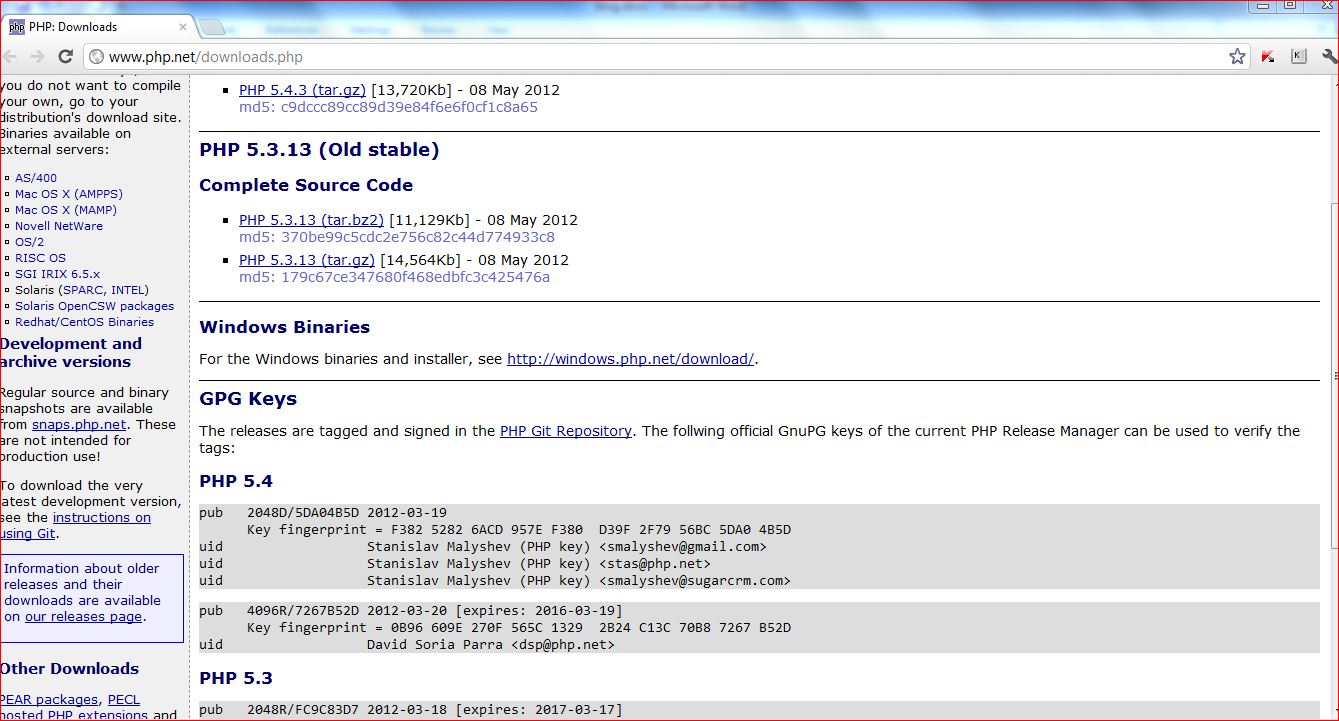
    Sep2: Now go to http://www.php.net/downloads.php  scroll down to Windows Binaries and click on


    On clicking the url specified in the above step, the following page will open :


    In the above page, click and Download  the latest non-thread-safe ZIP archive

    Unzip the downloaded archive to C: folder. Then, rename the unzipped folder as PHP as shown below.


    Step 3: create a copy of php.ini-development and rename it as php.ini.


    Step 4: Now open php.ini and change cgi.force_redirect = 0
    And also check cgi.fix_pathinfo = 1, fastcgi.impersonate = 1


    and set extension_dir appropriately:


    Step 5: As we installed PHP for windows on Step 1 now will cross check it. Go to Start/Control Panel/Programs/Turn Windows Features on or off and check on the Internet Information Services entry. Expand  the World Wide Web Services/Application Development Features/CGI node and also Web Management Tools/IIS Management Console.


    Step 6: Now, start the IIS Management Console; just open up the start menu, enter iis and hit Enter. There, navigate to the Sites/Default Web Site/Handler Mappings node and double-click on the "Handler Mappings" entry.


    Step 7: As a result of this, the Actions panel on the right hand side changes. You now see an option called Add Module Mapping. Clicking on it opens up a dialog which you fill out as you can see in the following figure (you may need to adapt the path used to your local system).


    Step 8: If you do not see the FastCgiModule entry, you probably forgot to check the CGI node when installing IIS. Otherwise, close the Add Module Mapping dialog by clicking on OK. You need to confirm that you want to create a FastCGI application; click Yes.


    Step 9: Finally, create a .php script and put it in the root folder of the IIS site (by default C:\Inetpub\wwwroot; note that you may need additional rights to write into that directory), e.g. phpinfo.php with a simple <?php phpinfo(); ?>  call in it. Call this script using http://localhost/phpinfo.php, and you may get internal server error.

    Step 10: If you get error message then go to start menu, enter iis and hit Enter. There, navigate to the Sites/Default Web Site/PHP Manager node and double-click on the "PHP Manager" entry.


    You can see a warning of not an optimal PHP configuration.


      click on the View recommendations and select all the recommendations and click ok.


    Step 11: check the URL now http://localhost/phpinfo.php and you are done!


    Tuesday, 15 November 2011

    XAML EAD Concepts

    Most of the interviewees who claim to have WPF knowledge, talk about hardware acceleration, 3D animation as some of the first few points. Frankly speaking, animation is a paradigm shift for an enterprise application developer's knowledgebase. Also, most of the WPF job requirements tilt towards the enterprise application development rather than the animation side. I bet there are not many end-users who would want rockets flying or crackers bursting in their application although that is not a bad idea and also these are the reasons probably Microsoft came up with XAML / WPF. Definitely zoom-in , zoom-out and transitions couldn't have been as smooth without WPF / XAML and not taking away any credits from those ease-of-programming capabilities with timelines and transitions , just wish to remind that Enterprise Applications are the morose kind coming from a conservative background. Not sure if this thought process can be changed overnight. Even now, when there is so much being talked about HTML5, aimed at a lot of interactivity between the user and the application, need to question about the applicability of it for an enterprise application scenario. But, probably the users are being prepared for such a change-over. Not venturing too much into such nitty-gritties, Databinding in WPF is a clinching EAD concept because a WPF developer can't escape it. Since Databinding is important, the accompaniments would be dependency properties, INotifyPropertyChanged interface. Then, command binding and MVVM pattern are valuable concepts to know. Also, the real capability of XAML can be appreciated only by someone who has a good understanding of layered architecture and patterns like MVP. But, this importance of knowing architectural patterns has got lost somewhere because OOPS concept is normally mis-interpreted equivalent to C# knowledge. XAML is such a paradigm shift from the old days of vb programming that only a good knowledge of patterns can bridge that gap. So, a rounded knowledge is necessary for a WPF EA Developer.

    Saturday, 12 November 2011

    Recession and Software Job market

    Recession / Unemployment are definitely not new terms in dictionary, only relevant to the current age. These terms have definitely been perennial problems for generations and will continue to be, just masquerading in different economic terms and conditions. But yes, with the given current age / trend of colleges and universities budgeoning everyday (or , every few hours?), things are going to get worse. As for everything, the survival of the fittest is applicable for this issue / situation too. Mankind is known for adaptability right from genesis. For the job market, this is more applicable and relevant : It is about understanding that there is a fitment for you if you are ready to adapt / align yourself to the market needs.  Also, we are taught right
    from childhood to "earn" respectable degrees but not to hone skills we are good at. This adds to the problem. A person who is ambi-dexterous in playing a percussion instrument ends up being a coder. This is fine until he starts thinking that he can use the computer keyboard as a percussion instrument literally! But, this is (figuratively!) a viable way if he is ready to realize that it would take sometime for him to learn the nuances and play the waiting game diligently in the industry he wants to be and shine. But, it mostly is not the case, the concerned aspirant thinks his salary and perks need to be inline with his peers and need to sky-rocket right from day one because he has bench-marked himself against those candidates who have been consistent with academics right from school days. Common , you can "earn" degrees but you can't "earn" skills / consistency. This paranoia is what results in disappointment finally. Also, this desperation is a good "cycle-gap" for technical training institutes who charge exorbitant rates for technical training courses. The course fees is also not an issue here but just that the curriculums do not meet the needs of the software industry. The candidates are offered the so-called "job-assistance" bait and pity is that they fall for it too. Until you are ready to be-lied , quacks will continue to have a gala time. But, the bitter part is when the aspirants try to cash-in on their investment somewhere else. You can't blame them too because they are under tremendous pressure since there has been a lot of investment on them all through the years in the form of school / college education fees and then the technical course fees and they want to get back this investment as soon as possible. Literally job market aspirants are small businessmen trying to break-even on their  investments. But, you can break-even only if you have the necessary skills to make a mark and then you can get what you want in the concerned industry. This completely is forgotten or lost in the commotion. This paranoia must be dealt-with through counselling by parents or teachers atleast until the next generation, when there is a chance to groom children in the area they are good at and honing skills over the years in that area rather than pressurizing children onto fields, they are not good  at, because some x's child is earning a lot of money in that field. All through different phases of our life, we need to realize that a SWOT analysis is a bare necessity : know your strengths, improve your weaknesses then, sky is the limit. No situation is formidable if you have a clarity of thoughts coming through this SWOT analysis.

    Thursday, 10 November 2011

    T-Softsol Employee Career Path

    When supply does not meet the demand, what happens as a result is innovation. T-Softsol thoroughly believes in this principle. Since T-Softsol has set its targets on niche areas, it is a known fact that building expertise would be the prime challenge. That is where T-Softsol started building course curriculums that capsulize years of toiled real-time project experience. T-Softsol training materials are not the omnipresent course materials available in the market with  the regular theory and practical exercises. T-Softsol curriculum is "project-based". Assoicates are provided training (materials) implementing a real-time project in a step-by-step approach. The employees are mandated to attend these step-by-step project oriented training to get to the next level. What the associate is made to imbibe is how to implement technical concepts and not technical skills. These are value-added trainings because the curriculum is as a result of lot of research and analysis  as to what really a recruiter / manager or an employer wants. Because, the T-Softsol visionaries have been in that pricking seat of a mentor and have seen how modern education system has spoilt the whole concept of education and made it a viable business. We are one among those who want to make a change to our current education system that is thoughtless because it is useless. A resource might be technically strong but what he needs to supplement is a business goal. So, he always need to have the big picture and vision about the project , the end-user and the business as such. This thought leadership is what T-Softsol wants to inculcate in its associates and T-Softsol is not bothered about the wait-time involved in getting the right resources with the right attitude because we know what we want. Our doors are open for anyone and everyone provided, they have the right attitude  towards the concept of business as such. We truly look for "Professionals" and if we can't find one, we believe in building Professionals who think there is no shortcut to good quality. We need associates who believe in us and we take the ownership of charting the career path for them. T-Softsol thus looks for people with high-levels of integrity and commitment - unfortunately such things lack place in our schools except for subject and marks. Pity. We desire to turn it all around someday. Join us if you are one who thinks like us.

    The T-Softsol way

    T-Softsol founded in the year 2009 as a Software lab believes in providing the best customer support in order to become the trusted partner for clients and enterpreneurs worldwide because engagements are trust-based and customers are the foundation of the trust. The T-Softsol vision is to be a strong group of technical force adapting to change in technology and trends. T-Softsol believes in an extremely agile principle when it comes to technology adaptation because technology is just a driving force to achieve a business goal. Keeping this core value in mind, T-Softsol has set its technical  target on niche areas like Oracle ODI, DataWarehousing, Android / iPhone application development and various custom frameworks. So, T-Softsol has pitched itself currently as a service-oriented company due to vast experience in the field of application enhancement and maintenance. In the area of product development, T-Softsol is building niche software products useful to a sales force of a company. T-Softsol is also coming up with frameworks / products in the areas of technical and management training / online exams. T-Softsol believes in the hard-core priniciple that customer is God. T-Softsol believes that customer satisfaction is the biggest deciding factor in the process of a company's survival. This is more relevant to the current cut-throat competition in the market place. T-Softsol thus believes in delivering high quality of work come what may in the process. T-Softsol and its affiliates / partners believe in this strong core value  of customer orientation and that is where the like-mindedness comes into picture because the vision is same though the people involved might be from diverse backgrounds.